Home › Invoice Tracker Lite
Invoice Tracker Lite · Free preview
Know who still owes you.
Track invoices, record part-payments and spot overdue balances in one Excel sheet.
Free .xlsx download · No email required · 200 invoices · Desktop Excel preview
A part-payment stays visible
An invoice for $1,200.
A payment of $600.
- Invoice total
- $1,200.00
- Received so far
- $600.00
- Still outstanding
- $600.00
Illustrative example. Draft and cancelled invoices stay out of the outstanding total.
Three steps to a clearer invoice list.
- Enter the invoice.
Add the client, due date and full amount. Choose Issued once you send it.
- Update what has been received.
Enter the total paid so far. Two $250 receipts mean $500 received.
- Review outstanding balances.
Unpaid amounts remain visible. Past-due invoices highlight automatically.
A small tool with a clear job.
The tracker records invoice balances. It does not calculate GST, personal tax or exchange rates.
Use one currency per workbook. The amount columns use a $ display by default; changing the display does not convert money.
Calculation cells are protected against accidental edits. Yellow cells are editable, and the included instructions explain how to keep a backup.
This is a preview release tested with a spreadsheet calculation engine. Native desktop Excel and Google Sheets acceptance are still pending. Check it with a few sample invoices before relying on it for your records.
See the example before you start.
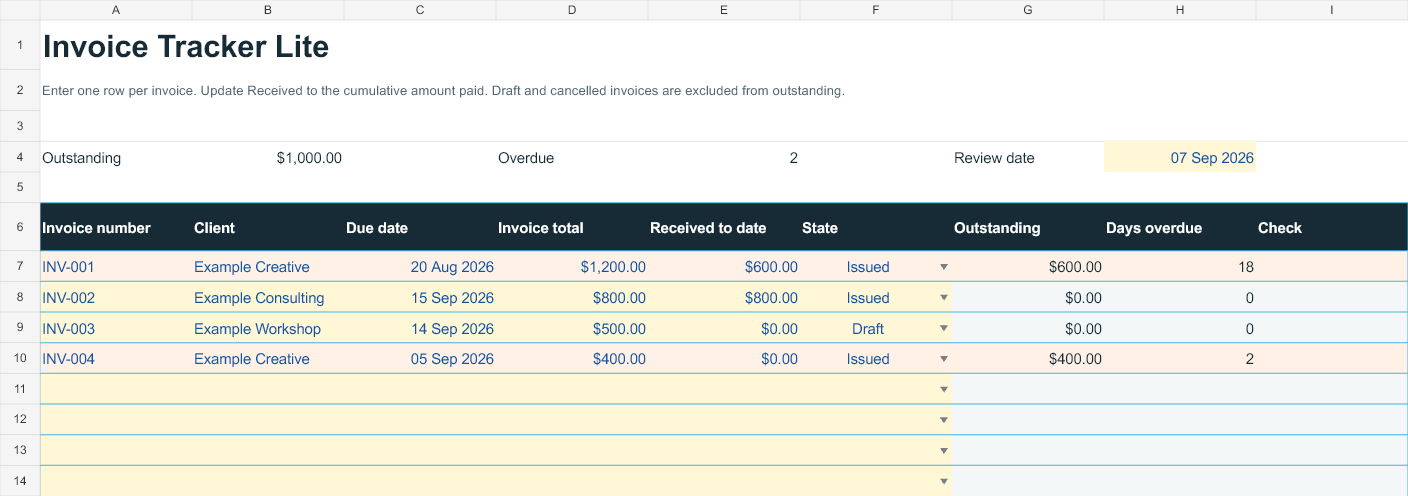
The blank download contains no example invoices. Your own records start at zero.
For Australian freelancers
Need the expenses and tax-reserve side too?
Freelance Finance OS brings together invoice receipts, expenses, eligible mileage, GST estimates and a printable service invoice.
Explore the Australian edition →