Home › Freelance Finance OS
Freelance Finance OS · Australia
Your freelance finances, in one place.
See who owes you, record what you spend, and plan what to set aside. A practical Excel workbook for Australian freelancers who invoice for their services.
Paid edition in preparation · Free tracker preview available now
A clearer view of the money
- Client receipts
- $5,120.00
- Business cash expenses
- $330.00
- Cash remaining before tax
- $4,790.00
- Unpaid invoices
- $2,200.00
- Income-tax reserve at 25%
- $1,091.33
- Net GST estimate
- $290.00
Fictional worked example from the workbook. Reserve percentages are user inputs; these are not estimates of your personal tax.
Built around the weekly admin
Invoices, receipts and the decisions between them.
For sole traders who want organised records without setting up a complete accounting system.
Designed for cash-basis service businesses. Your accountant can help determine the tax treatment of your records.
See what is still unpaid
Record deposits and instalments against each invoice. Outstanding balances exclude drafts and cancelled work.
Keep a useful expense record
Record payments, eligible GST and the business-use share. Keep deductible and non-deductible costs separate.
Plan a reserve for tax
Choose your reserve percentage and review cash-basis GST estimates. Annual and quarterly figures use the same records.
Bring the right year into view
July-to-June reporting, date-specific mileage rates and a separate annual kilometre cap for each eligible car.
Send a clear invoice
Choose an issued invoice and print it to PDF. The title and GST line follow that invoice’s treatment.
Start with a clean file
A blank workbook for your records, a separate fictional example and a short setup guide. Editable cells are clearly marked.
The actual workbook
Ten connected tabs. Yellow cells are yours to edit; calculation cells are protected against accidental typing.
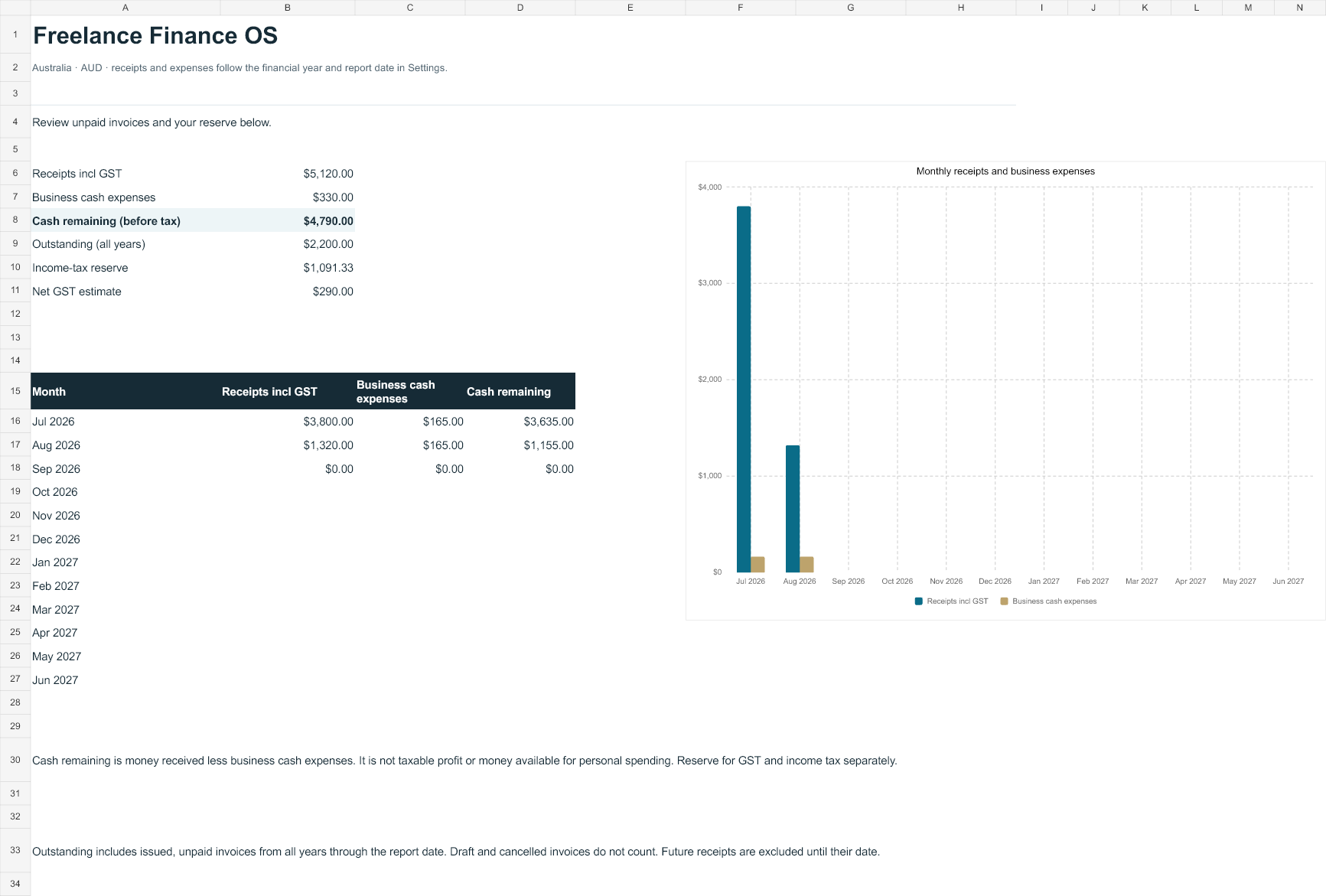
Preview rendered from the fictional example workbook. Desktop Excel acceptance is still pending.
Start free. Add the rest when you need it.
| What you need | Free tracker | Finance OS |
|---|---|---|
| Invoices and unpaid balances | Yes | Yes |
| Part-payments | Cumulative amount | Separate receipt log |
| Expenses and business-use share | — | Yes |
| Australian mileage estimates | — | Yes |
| GST and tax-reserve planning | — | Yes |
| Printable service invoice | — | Yes |
Australian edition
Freelance Finance OS
A$29
Planned one-time launch price. Not yet on sale.
- Blank customer workbook and worked example
- 300 invoices and 600 receipt entries
- 300 expenses, 600 trips and 100 clients
- Setup guide and invoice-printing instructions
- Single-user business licence
We’re completing compatibility checks before taking payments. The free tracker is available while we prepare the full edition.
Before you choose it
Will it calculate my tax return or lodge a BAS?
No. It organises cash-basis records and estimates a reserve using your chosen percentage. GST summaries depend on the eligibility and amounts you enter. It does not calculate personal income tax, Medicare, HELP, PAYG instalments or depreciation, and it does not lodge anything.
What if I am not registered for GST?
Choose “No GST” for the invoice and enter zero eligible GST credits in Expenses. The invoice prints as a regular invoice. Do not charge GST or claim GST credits unless you are entitled to do so. The workbook does not decide when you must register.
Does it support refunds, overseas clients and every kind of invoice?
This edition handles positive AUD receipts and single-service invoices. Refunds, credit notes, foreign currencies, inventory and mixed-tax invoice lines need another workflow. International transactions can involve additional tax rules; check those with your adviser.
Does it work with Google Sheets?
It is designed for desktop Excel. Google Sheets import has not yet been certified, so we do not promise that formulas, dropdowns, protection and invoice printing will all transfer correctly.
Where do my financial records go?
The workbook has no macros, external data connections or upload features. Your records stay wherever you save the file. If you save it in OneDrive, Google Drive or another cloud service, that service’s privacy terms apply. Purchasing through Gumroad is a separate transaction.
Do I get future tax-year updates?
The included mileage table covers financial years beginning July 2024, July 2025 and July 2026. Unsupported years show a correction message. Future editions and maintenance terms will be stated at checkout; there is no lifetime tax-update promise.
Get a handle on unpaid invoices today.
Start with the free tracker and see whether the spreadsheet workflow suits you.
Get Invoice Tracker Lite →